

Download
Download this notebook: plot_04_batch_glm.ipynb!
Batching example#
Here we demonstrate how to setup and run a stochastic gradient descent in nemos
by batching and using the update method of the model class.
import matplotlib.pyplot as plt
import numpy as np
import pynapple as nap

import nemos as nmo

nap.nap_config.suppress_conversion_warnings = True

# set random seed
np.random.seed(123)
Simulate data#
Let’s generate some data artificially
n_neurons = 10
T = 50

times = np.linspace(0, T, 5000).reshape(-1, 1)
rate = np.exp(np.sin(times + np.linspace(0, np.pi*2, n_neurons).reshape(1, n_neurons)))
Get the spike times from the rate and generate a TsGroup object
spike_t, spike_id = np.where(np.random.poisson(rate))
units = nap.Tsd(spike_t/T, spike_id).to_tsgroup()
Model configuration#
Let’s imagine this dataset do not fit in memory. We can use a batching approach to train the GLM.
First we need to instantiate the PopulationGLM . The default algorithm for PopulationGLM is LBFGS, but for batching, we suggest to use gradient descent, since the hessian estimation on batches is generally noisy.
Note
You must shutdown the dynamic update of the step for fitting a batched (also called stochastic) gradient descent.
For the GradientDescent solver, this can be done by setting the parameters acceleration to False and setting the stepsize.
glm = nmo.glm.PopulationGLM(
	solver_name="GradientDescent",
	solver_kwargs={"stepsize": 0.1, "acceleration": False}
	)
Basis instantiation#
Here we instantiate the basis. ws is 40 time bins. It corresponds to a 200 ms windows
ws = 40
basis = nmo.basis.RaisedCosineLogConv(5, window_size=ws)
Batch definition#
The batch size needs to be larger than the window size of the convolution kernel defined above.
batch_size = 5 # second
Here we define a batcher function that generate a random 5 s of design matrix and spike counts. This function will be called during each iteration of the stochastic gradient descent.
def batcher():
	# Grab a random time within the time support. Here is the time support is one epoch only so it's easy.
	t = np.random.uniform(units.time_support[0, 0], units.time_support[0, 1]-batch_size)

	# Bin the spike train in a 1s batch
	ep = nap.IntervalSet(t, t+batch_size)
	counts = units.restrict(ep).count(0.005)  # count in 5 ms bins

	# Convolve
	X = basis.compute_features(counts)

	# Return X and counts
	return X, counts
Solver initialization#
First we need to initialize the gradient descent solver within the PopulationGLM .
This gets you the initial parameters and the first state of the solver.
params = glm.initialize_params(*batcher())
state = glm.initialize_optimizer_and_state(params, *batcher())
Batch learning#
Let’s do a few iterations of gradient descent calling the batcher function at every step.
At each step, we store the log-likelihood of the model for each neuron evaluated on the batch
n_step = 500
logl = np.zeros(n_step)

for i in range(n_step):

	# Get a batch of data
	X, Y = batcher()

	# Do one step of gradient descent.
	params, state = glm.update(params, state, X, Y)

	# Score the model along the time axis
	logl[i] = glm.score(X, Y, score_type="log-likelihood")
Input validation
The update method does not perform input validation each time it is called.
This design choice speeds up computation by avoiding repetitive checks. However,
it requires that all inputs to the update method strictly conform to the expected
dimensionality and structure as established during the initialization of the solver.
Failure to comply with these expectations will likely result in runtime errors or
incorrect computations.
First let’s plot the log-likelihood to see if the model is converging.
fig = plt.figure()
plt.plot(logl)
plt.xlabel("Iteration")
plt.ylabel("Log-likelihood")
plt.show()
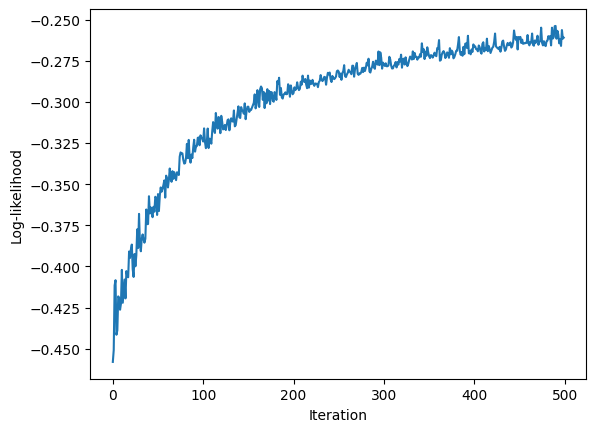
We can see that the log-likelihood is increasing but did not reach plateau yet. The number of iterations can be increased to continue learning.
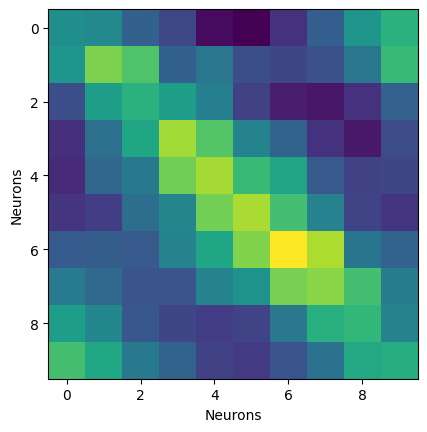
We can take a look at the coefficients.
Here we extract the weight matrix of shape (n_neurons*n_basis, n_neurons)
and reshape it to (n_neurons, n_basis, n_neurons).
We then average along basis to get a weight matrix of shape (n_neurons, n_neurons).
W = glm.coef_.reshape(len(units), basis.n_basis_funcs, len(units))
Wm = np.mean(np.abs(W), 1)

# Let's plot it.

plt.figure()
plt.imshow(Wm)
plt.xlabel("Neurons")
plt.ylabel("Neurons")
plt.show()
Model comparison#
Since this example is small enough, we can fit the full model and compare the scores. Here we generate the design matrix and spike counts for the whole dataset.
Y = units.count(0.005)
X = basis.compute_features(Y)
full_model = nmo.glm.PopulationGLM().fit(X, Y)
/home/docs/checkouts/readthedocs.org/user_builds/nemos/envs/stable/lib/python3.12/site-packages/nemos/glm/glm.py:841: RuntimeWarning: The fit did not converge. Consider the following:
1) Enable float64 with ``jax.config.update('jax_enable_x64', True)``
2) Increase the max number of iterations or increase tolerance (if reasonable). These parameters can be specified by providing a ``solver_kwargs`` dictionary. For the available options see the ``self.solver.__init__`` docstrings.
  warnings.warn(
Now that the full model is fitted, we are scoring the full model and the batch model against the full datasets to compare the scores. The score is pseudo-R2
full_scores = full_model.score(
	X, Y, aggregate_sample_scores=lambda x:np.mean(x, axis=0), score_type="pseudo-r2-McFadden"
)
batch_scores = glm.score(
	X, Y, aggregate_sample_scores=lambda x:np.mean(x, axis=0), score_type="pseudo-r2-McFadden"
)
Let’s compare scores for each neurons as well as the coefficients.
plt.figure(figsize=(10, 8))
gs = plt.GridSpec(3,2)
plt.subplot(gs[0,:])
plt.bar(np.arange(0, n_neurons), full_scores, 0.4, label="Full model")
plt.bar(np.arange(0, n_neurons)+0.5, batch_scores, 0.4, label="Batch model")
plt.ylabel("Pseudo R2")
plt.xlabel("Neurons")
plt.ylim(0, 1)
plt.legend()
plt.subplot(gs[1:,0])
plt.imshow(Wm)
plt.title("Batch model")
plt.subplot(gs[1:,1])
Wm2 = np.mean(
	np.abs(
		full_model.coef_.reshape(len(units), basis.n_basis_funcs, len(units))
		)
	, 1)
plt.imshow(Wm2)
plt.title("Full model")
plt.tight_layout()
plt.show()
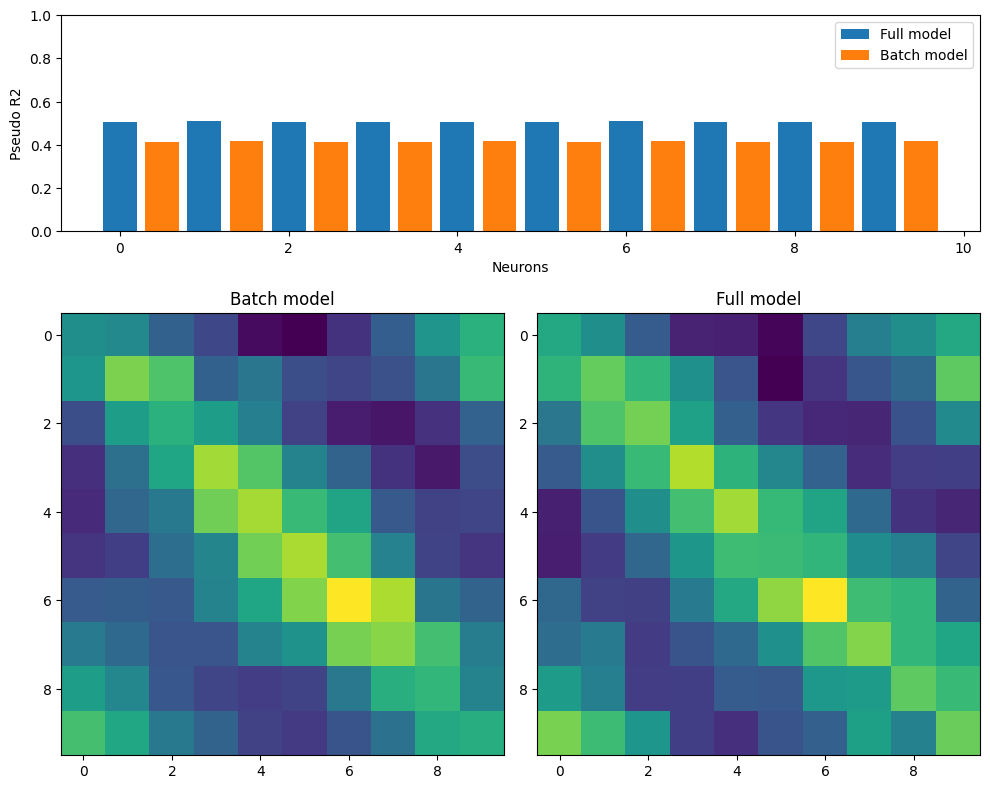
As we can see, with a few iterations, the batch model manage to recover a similar coefficient matrix.