

Download
Download this notebook: plot_04_v1_cells.ipynb!
Fit V1 cell#
The data presented in this notebook was collected by Sonica Saraf from the Movshon lab at NYU.
The notebook focuses on fitting a V1 cell model.
import matplotlib.pyplot as plt
import numpy as np
import pynapple as nap

import nemos as nmo

# configure plots some
plt.style.use(nmo.styles.plot_style)
Data Streaming#
path = nmo.fetch.fetch_data("m691l1.nwb")
Downloading file 'm691l1.nwb' from 'https://osf.io/download/xesdm/' to '/home/docs/.cache/nemos'.
Pynapple#
The data have been copied to your local station. We are gonna open the NWB file with pynapple
dataset = nap.load_file(path)
What does it look like?
print(dataset)
m691l1
┍━━━━━━━━━━━━┯━━━━━━━━━━━━━┑
│ Keys       │ Type        │
┝━━━━━━━━━━━━┿━━━━━━━━━━━━━┥
│ units      │ TsGroup     │
│ epochs     │ IntervalSet │
│ whitenoise │ TsdTensor   │
┕━━━━━━━━━━━━┷━━━━━━━━━━━━━┙
Let’s extract the data.
epochs = dataset["epochs"]
units = dataset["units"]
stimulus = dataset["whitenoise"]
Stimulus is white noise shown at 40 Hz
fig, ax = plt.subplots(1, 1, figsize=(12,4))
ax.imshow(stimulus[0], cmap='Greys_r')
stimulus.shape
(96001, 51, 51)
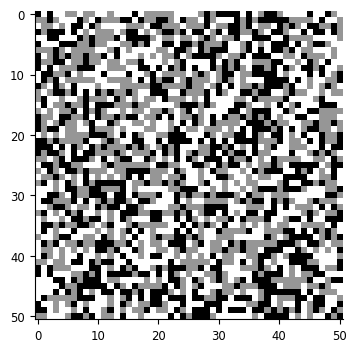
There are 73 neurons recorded together in V1. To fit the GLM faster, we will focus on one neuron.
print(units)
# this returns TsGroup with one neuron only
spikes = units[[34]]
  Index      rate  location      group
-------  --------  ----------  -------
      1   0.34316  v1                0
     11   0.726    v1                0
     19   0.57753  v1                0
     20   5.96505  v1                0
     23   2.86105  v1                0
     26   3.67212  v1                0
     30   1.47817  v1                0
     33   1.01763  v1                0
     34   8.5582   v1                0
     36   0.45973  v1                0
     38   0.25318  v1                0
     40  21.8111   v1                0
     41   2.12646  v1                0
     50   0.29449  v1                0
     54  12.0761   v1                0
     56   1.09534  v1                0
     60   1.47368  v1                0
     64   0.00164  v1                0
     69   9.08541  v1                0
     72  13.8672   v1                0
     75   1.08389  v1                0
     76   0.97141  v1                0
     81   0.89778  v1                0
     82   1.36529  v1                0
     86   3.20707  v1                0
     88   0.01472  v1                0
     90   2.85287  v1                0
     97   0.5988   v1                0
     98   0.75218  v1                0
    109   1.63401  v1                0
    110   0.00654  v1                0
    112   9.66867  v1                0
    116   3.46639  v1                0
    121   1.61315  v1                0
    126   3.0541   v1                0
    131   0.89983  v1                0
    137   5.21369  v1                0
    141  10.4335   v1                0
    146   2.46103  v1                0
    151   8.91976  v1                0
    154   5.90084  v1                0
    159   4.8374   v1                0
    160   1.10679  v1                0
    169   4.6513   v1                0
    171   0.3722   v1                0
    175   2.55838  v1                0
    176   1.64178  v1                0
    179   6.00718  v1                0
    180   1.25976  v1                0
    185   6.37366  v1                0
    187  27.0534   v1                0
    188   1.06793  v1                0
    192   1.3612   v1                0
    197   0.99063  v1                0
    202   2.5682   v1                0
    205   1.73913  v1                0
    215   0.03477  v1                0
    219   0.81966  v1                0
    222   0.08426  v1                0
    224   8.34633  v1                0
    231   0.32926  v1                0
    233   3.88358  v1                0
    235   5.2865   v1                0
    238   3.59318  v1                0
    245   1.93259  v1                0
    249   0.01268  v1                0
    251   1.42091  v1                0
    255   6.5164   v1                0
    257   5.83049  v1                0
    261   1.13256  v1                0
    262   1.74526  v1                0
    266   1.79148  v1                0
    269  11.6111   v1                0
How could we predict neuron’s response to white noise stimulus?
we could fit the instantaneous spatial response. that is, just predict neuron’s response to a given frame of white noise. this will give an x by y filter. implicitly assumes that there’s no temporal info: only matters what we’ve just seen
could fit spatiotemporal filter. instead of an x by y that we use independently on each frame, fit (x, y, t) over, say 100 msecs. and then fit each of these independently (like in head direction example)
that’s a lot of parameters! can simplify by assuming that the response is separable: fit a single (x, y) filter and then modulate it over time. this wouldn’t catch e.g., direction-selectivity because it assumes that phase preference is constant over time
could make use of our knowledge of V1 and try to fit a more complex functional form, e.g., a Gabor.
That last one is very non-linear and thus non-convex. we’ll do the third one.
in this example, we’ll fit the spatial filter outside of the GLM framework, using spike-triggered average, and then we’ll use the GLM to fit the temporal timecourse.
Spike-triggered average#
Spike-triggered average says: every time our neuron spikes, we store the stimulus that was on the screen. for the whole recording, we’ll have many of these, which we then average to get this STA, which is the “optimal stimulus” / spatial filter.
In practice, we do not just the stimulus on screen, but in some window of time around it. (it takes some time for info to travel through the eye/LGN to V1). Pynapple makes this easy:
sta = nap.compute_event_triggered_average(stimulus, spikes, binsize=0.025,
                                        window=(-0.15, 0.0))
sta is a TsdTensor, which gives us the 2d receptive field at each of the
time points.
sta
Time (s)
----------  -------------------------------------
-0.15       [[[0.009473 ... 0.008994] ...] ...]
-0.125      [[[0.011004 ... 0.001244] ...] ...]
-0.1        [[[-0.003397 ...  0.004449] ...] ...]
-0.075      [[[-0.004497 ...  0.005167] ...] ...]
-0.05       [[[ 0.008851 ... -0.00555 ] ...] ...]
-0.025      [[[-0.001148 ...  0.009808] ...] ...]
0           [[[0.000765 ... 0.001818] ...] ...]
dtype: float64, shape: (7, 1, 51, 51)
We index into this in a 2d manner: row, column (here we only have 1 column).
sta[1, 0]
array([[ 0.01100373, -0.00052627,  0.00186585, ..., -0.00459286,
        -0.01066884,  0.0012439 ],
       [ 0.00138743,  0.00999904, -0.00478423, ..., -0.00019137,
        -0.00162664,  0.01636207],
       [ 0.0065544 ,  0.00200938, -0.01114726, ..., -0.0046407 ,
        -0.0083724 ,  0.00516697],
       ...,
       [ 0.0003349 ,  0.00291838, -0.00688929, ..., -0.00755909,
        -0.00956846, -0.01789302],
       [-0.01908908,  0.00301407,  0.00478423, ..., -0.00066979,
        -0.00483207,  0.00138743],
       [-0.00172232, -0.00794182, -0.00492776, ...,  0.00315759,
         0.00990336, -0.0012439 ]], shape=(51, 51))
we can easily plot this
fig, axes = plt.subplots(1, len(sta), figsize=(3*len(sta),3))
for i, t in enumerate(sta.t):
    axes[i].imshow(sta[i,0], vmin = np.min(sta), vmax = np.max(sta),
                   cmap='Greys_r')
    axes[i].set_title(str(t)+" s")

that looks pretty reasonable for a V1 simple cell: localized in space, orientation, and spatial frequency. that is, looks Gabor-ish
To convert this to the spatial filter we’ll use for the GLM, let’s take the average across the bins that look informative: -.125 to -.05
# mkdocs_gallery_thumbnail_number = 3
receptive_field = np.mean(sta.get(-0.125, -0.05), axis=0)[0]

fig, ax = plt.subplots(1, 1, figsize=(4,4))
ax.imshow(receptive_field, cmap='Greys_r')
<matplotlib.image.AxesImage at 0x74fc8f5ab2f0>
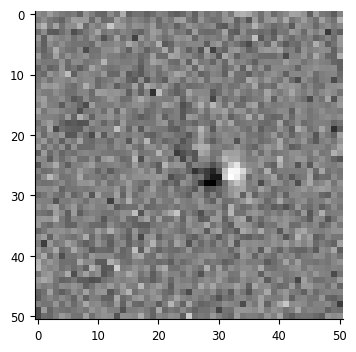
This receptive field gives us the spatial part of the linear response: it gives a map of weights that we use for a weighted sum on an image. There are multiple ways of performing this operation:
# element-wise multiplication and sum
print((receptive_field * stimulus[0]).sum())
# dot product of flattened versions
print(np.dot(receptive_field.flatten(), stimulus[0].flatten()))
-0.1176203234140274
-0.11762032341402756
When performing this operation on multiple stimuli, things become slightly
more complicated. For loops on the above methods would work, but would be
slow. Reshaping and using the dot product is one common method, as are
methods like np.tensordot.
We’ll use einsum to do this, which is a convenient way of representing many different matrix operations:
filtered_stimulus = np.einsum('t h w, h w -> t', stimulus, receptive_field)
This notation says: take these arrays with dimensions (t,h,w) and (h,w)
and multiply and sum to get an array of shape (t,). This performs the same
operations as above.
And this remains a pynapple object, so we can easily visualize it!
fig, ax = plt.subplots(1, 1, figsize=(12,4))
ax.plot(filtered_stimulus)
[<matplotlib.lines.Line2D at 0x74fcac3274a0>]
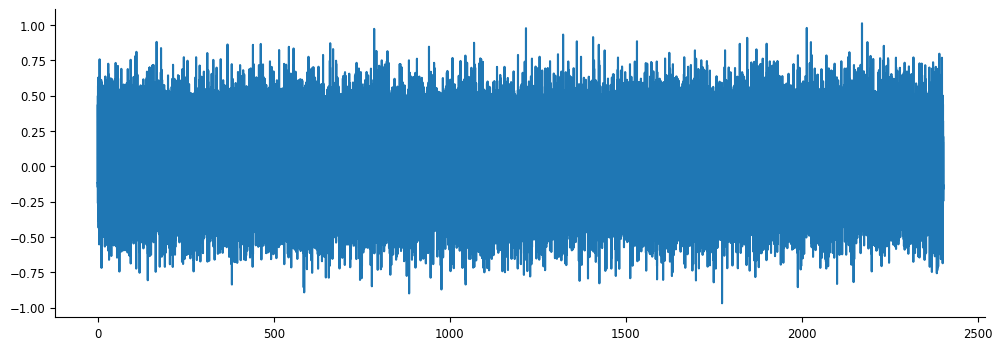
But what is this? It’s how much each frame in the video should drive our neuron, based on the receptive field we fit using the spike-triggered average.
This, then, is the spatial component of our input, as described above.
Preparing data for NeMoS#
We’ll now use the GLM to fit the temporal component. To do that, let’s get this and our spike counts into the proper format for NeMoS:
# grab spikes from when we were showing our stimulus, and bin at 1 msec
# resolution
bin_size = .001
counts = spikes[34].restrict(filtered_stimulus.time_support).count(bin_size)

print(counts.rate)
print(filtered_stimulus.rate)
1000.0001425044871
39.9731573425015
Hold on, our stimulus is at a much lower rate than what we want for our rates
– in previous tutorials, our input has been at a higher rate than our spikes,
and so we used bin_average to down-sample to the appropriate rate. When the
input is at a lower rate, we need to think a little more carefully about how
to up-sample.
print(counts[:5])
print(filtered_stimulus[:5])
Time (s)
----------  --
0.0005       0
0.0015       0
0.0025       0
0.0035       0
0.0045       0
dtype: int64, shape: (5,)
Time (s)
----------  ----------
0           -0.11762
0.025017     0.224512
0.0500341    0.0305712
0.0750511    0.297902
0.100068    -0.0934241
dtype: float64, shape: (5,)
What was the visual input to the neuron at time 0.005? It was the same input as time 0. At time 0.0015? Same thing, up until we pass time 0.025017. Thus, we want to “fill forward” the values of our input, and we have pynapple convenience function to do so:
filtered_stimulus = counts.value_from(filtered_stimulus, mode="before")
filtered_stimulus
Time (s)
---------------------  ----------
0.0005                 -0.11762
0.0015                 -0.11762
0.0025                 -0.11762
0.0035                 -0.11762
0.0045000000000000005  -0.11762
0.0055                 -0.11762
0.006500000000000001   -0.11762
...
2401.6305              -0.0683786
2401.6315              -0.0683786
2401.6325              -0.0683786
2401.6335              -0.0683786
2401.6345              -0.0683786
2401.6355000000003     -0.0683786
2401.6365              -0.0683786
dtype: float64, shape: (2401637,)
We can see that the time points are now aligned, and we’ve filled forward the values the way we’d like.
Now, similar to the head direction tutorial, we’ll use the log-stretched raised cosine basis to create the predictor for our GLM:
window_size = 100
basis = nmo.basis.RaisedCosineLogConv(8, window_size=window_size)

convolved_input = basis.compute_features(filtered_stimulus)
/home/docs/checkouts/readthedocs.org/user_builds/nemos/envs/latest/lib/python3.12/site-packages/pynapple/core/utils.py:198: UserWarning: Converting 'd' to numpy.array. The provided array was of type 'ArrayImpl'.
  warnings.warn(
convolved_input has shape (n_time_pts, n_features * n_basis_funcs), because n_features is the singleton dimension from filtered_stimulus.
Fitting the GLM#
Now we’re ready to fit the model! Let’s do it, same as before:
model = nmo.glm.GLM()
model.fit(convolved_input, counts)
GLM(
    observation_model=PoissonObservations(),
    inverse_link_function=exp,
    regularizer=UnRegularized(),
    solver_name='LBFGS'
)
In a Jupyter environment, please rerun this cell to show the HTML representation or trust the notebook. On GitHub, the HTML representation is unable to render, please try loading this page with nbviewer.org.
Parameters
| observation_model | PoissonObservations() | |
| inverse_link_function | <function exp...x74fc902d9ee0> | |
| regularizer | UnRegularized() | |
| solver_name | 'LBFGS' | |
| solver_kwargs | {} | |
| regularizer_strength | None |
Fitted attributes
| Name | Type | Value |
|---|---|---|
| aux_ | NoneType | None |
| coef_ | ArrayImpl[float32](8,) | Array([-0.383...dtype=float32) |
| dof_resid_ | ArrayImpl[float32](1,) | Array([2.4016...dtype=float32) |
| intercept_ | ArrayImpl[float32](1,) | Array([-4.916...dtype=float32) |
| scale_ | ArrayImpl[float32](1,) | Array([1.], dtype=float32) |
| solver_state_ | OptimistixAdapterState | OptimistixAda...k_bool[] ) ) |
We have our coefficients for each of our 8 basis functions, let’s combine them to get the temporal time course of our input:
time, basis_kernels = basis.evaluate_on_grid(window_size)
time *= bin_size * window_size
temp_weights = np.einsum('b, t b -> t', model.coef_, basis_kernels)
plt.plot(time, temp_weights)
plt.xlabel("time[sec]")
plt.ylabel("amplitude")
Text(0, 0.5, 'amplitude')
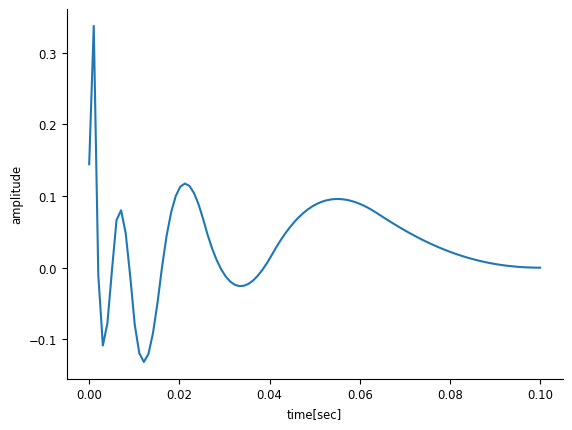
When taken together, the results of the GLM and the spike-triggered average give us the linear component of our LNP model: the separable spatio-temporal filter.